
کلینیک فوق تخصصی اکسس ( کاربرد vba در اکسس )
به اشتراک گذاری اطلاعات کسب شده در اکسس از سایت آفیس و سایت های تخصصی خارجی
کلینیک فوق تخصصی اکسس ( کاربرد vba در اکسس )
به اشتراک گذاری اطلاعات کسب شده در اکسس از سایت آفیس و سایت های تخصصی خارجیدرباره من
 This topic is a little part of programming in access , We have reached to this goal just with efforts and more exercises also studying the Microsoft Office Documents and their various forums
ادامه...
This topic is a little part of programming in access , We have reached to this goal just with efforts and more exercises also studying the Microsoft Office Documents and their various forums
ادامه...
نظرسنجی
روزانهها
همه- شیان فان
- انهدام شبکه جاسوسی در یمن عربستان انگلیس آمریکا فرانسه آلمان ایتالیا
- Unicode converter
- GSM
- داروی اوسلتامیویر (تامی فلو) برای درمان و پیشگیری از آنفولانزا
- عزیز جون پرستو ... کنسرت کاروانسرا
- دختر علوم و تحقیقات عریان شدن در دانشگاه آبان ۱۴۰۳
- Asme viii
- تفسیر قانون ورود به پزشکی بدون کنکور المپیک ۲۰۲۴
- مسابقات جهانی آرایش
- جولان افغان ها در ایران از خرید تا اجاره ملک و خودرو
- یا حسین میر حسین
- ایران کابل دوم دریاچه چیتگر و منطقه ۱۲ بازار تهران
- امام جمعه موقت تهران حاج کاظم صدیقی باغ ۱۰۰۰ میلیاردی
- یک فساد ؟!!! حجت الاسلام کاظم صدیقی
پیوندها
- WINAPI
- آپارات
- توابع API ویندوز 64 بیت
- پیام های ویندوزی / SETIMAGE
- Custom MessageBox
- (Hook InpotBox[32 Bit] (Mask Character
- COLOR TYPES
- Index Of SysColor
- ایجاد هاشور HATCH BRUSH
- UI Automation Support for Standard Controls
- GETSYSTEMMETRICS گرفتن ابعاد سیستم
- CONSTANTS
- CHARSET
- UNICODE
- Geometric Shapes
- Chinese, Japanese, and Korean
- Using Common Controls In Dialog Box
- UpDown Control
- UpDown Styles
- System Constant
- List Box Message
- COMBOBOX WM_DRAWITEM
- 6Logical Operators عملگرهای منطقی
- توابع شمسی و عدد به حروف
- unicode-symbols.html
- استاندارد لوله کشی
- مخروط و استوانه بخش لوله کشی
- acSysCmdAction
- Guide To Expression Suntax جهت مطالعه
- عضویت پولی واقعا تعجب برانگیزه
- Default Value
- Quotation Marks
- Reposition a Form
- ساخت منوی آبشاری حتی کسانیکه یکروزه اکسس را فرا می گیرند
- KeyDown
- Object Tab
- هر آنچه را که باید در ارجاع به شئ TabControl بدانیم
- ShortCut Keys
- Application.SysCmd
- SysCmd Action
- API FUNCTION 64 BIT
- VbMsgBoxStyle
- MsgBox
- (Access To System File( FileSystemObject
- Reset AutoNumber Field Value
- Access Simple Query
- How to change the 12 Hour Clock to a 24 Hour Clock in Windows 8
- QueryDef.Execute Method
- CurrentDb.Execute Method
- Parameters Collection QueryDef.Parameters
- QueryDef.Parameters
- Row Number Form + Report
- RecordSet.Eof Property
- Window Styles
- Extended Window Styles
- GWL_STYLE
- EnableMenuItem
- پر کردن تکست باکس ها با انتخاب کمبو باکس دارای چندین ستون
- بعلت افزایش حجم فایل اکسس بهتر است از Attachment استفاده نکنید
- متد Presentations.Open برای فایل پاورپوینت
- IMP Operator
- Layerd Windows کاربرد در Transparent صفر یا 255 bAlpha is 0, the window is completely transparent. When bAlpha is 255, the window is opaque.
- SendKeys in Visual Basic Script .. vbs file using NotePad Wscript.Shell
- Start/Command Line
- Application.SetOption تنظیم خواص دیتابیس اکسس ( راهنما )
- Application.RefreshTitleBar
- تغییر آیکون در TaskBar
- MultiValued Fields Parent And Child ... Use Recordset .... Value Or Data
- Bit Block Transfer
- چرخش متن
- چرخش متن
- Type Conversion Functions
- توابع API چیست
- ارسال به سرور winhttprequest و دریافت پیام از سرور
- Stream Object
- رفتارشما
- ( GDI ( GDI32.DLL رابط گرافیکی ( فرمت تکست مثل تنظیم پیش زمینه ، چرخش و غیره در دستگاه ویدئو مانیتور و پرینتر )
- Rotate چرخش متن در لیبل توابع API ، فایل رابط گرافیکی GDI32.DLL
- انواع کنترل ها در اکسس با شماره اختصاصی مربوطه
- GetCurrentObject توابع Api ، گرفتن آبجکت مثل Font یا Brush
- SMSPDU کد کردن پیامک ( Short Message Sending )
- Open Statement باز کردن فایل در حالت دسترسی باینری برای خواندن و نوشتن
- Window Media Player ActiveX Control نمایش ویدئو در اکسس با کنترل اکتیو ایکس
- ShellExecuteA ( توابع ویندوزی برای انجام عملیاتی روی فایل مشخص) انجام عملیات مثل باز کردن فایل مشخص در Parent مثل webbrowser
- WebBrowser_CommandStateChanged چک کردن فعال یا غیر فعال بودن فرمان ( Commad )
- Jalali Calendar تبدیل میلادی - شمسی
- twip
- AT COMMAND TESTER خروجی از دفترچه تلفن
- MSCOMM32 روش نصب فایل MSCOMM32 در ویندوز 64 برای گرفتن داده از سریال پورت
- تابع ShowWindow در کتابخانه user32 نمایش پنجره در حالت ماکزیمایز یا مینیمایز
- Resize The Window تغییر سایز پنجره در اکسس با متد RunCommand
- تابع GetSystemMenu تابعی برای گرفتن هندل پنجره SysMenu یا همان سینی باتن های min max close
- AT COMMAND ارسال دیتا
- Custom Msgbox دیالوگ باکس پیام - هوک کردن
- Window Procedure تابع برگشتی مدیریت پنجره
- DPI
- Bitmap Function توابع Bitmap در GDI
- GetCursorPos گرفتن موقعیت کرسر ( x,y )
- WM_LBUTTONDOWN پیام ویندوزی کلیک کردن دکمه چپ ماوس
- Shell32.Dll ICON آیدی آیکون های کتابخانه Shell
- کاراکتر فارسی
- AppTitle And AppIcon دو پراپرتی در اکسس جهت اضافه کردن Tittle در Title Bar و آیکون به دیتابیس
- ایجاد لینک در Msgbox
- Subclassing در ویژوال بیسیک دانلود رایگان
- بیمه تکمیلی 1400-1401 بدون سقف مدرسه عالی مطهری !!!
- winhttp Function توابع win hypertrxttransferprotocol
- سرزنده 102 سالگی پایان نیست
- how to use enter from edit control in dialog box چگونگی استفاده از کنترل Edit در دیالوگ باکس
- Button + Edit Control استفاده از GetSystemMetrics
- Button In Edit
- ساخت نوار ابزار عمودی
- Window Classes کلاس های پنجره برای ساخت باتن ، کنترل ویرایش ، لینک و نوار ابزار
- Source Code For ToolBars کد برای نوار ابزار
- MakeLong in vba
- Enable user to move and size a bitmap
- About Syslink Controls درباره کنترل های Syslink
- Pointers in Visual Basic نشانگرها در ویژوال بیسیک
- How to vreate a Command link نحوه ساختن لینک دستوری با یادداشت مربوطه
- NMLINK Structure Notification Message Link
- NM_CLICK Notification message _ Click syslink
- NM_RETURN Notification message ... Enter Key Syslink ... item
- TBADDBITMAP اضافه کردن bitmap به تصویر باتن در پنجره ToolBar
- Whats app دانلود
- تنظیم فرمت یا قالب ورودی داده در کنترل Control-data-entry-formats
- اضافه کردن ستون به جدول با دستورات Sql موجود در اکسس Create Table And Add Column
- رحم اجاره ای اخاذی جدید و نبودن قانون از ۵۰ تا ۲۰۰ میلیون تومان در سال ۱۴۰۱
- احکام 18+
- خواص ، اشیاء و رویدادهای اکتیو ایکس WebBrowser
- شارلی ابدو
- تجاوز سخیف و وحشتناک چند افغانی به یک زن در فرحزاد
- شی TextStream خواندن یا نوشتن
- شئ ADO Stream برای نوشتن و خواندن جریانی از داده ها باینری
- طرح جدید پذیرش بدون کنکور پزشکی المپیکیها
AcceeVba
Menu inputbox اکسس Windows Message برنامه نویسی در اکسس SubClass Shell کوئری SMS-SUBMIT ListBox nccalcsize WM_MOUSEMOVE Ptinrect HOOK کمبوباکس Timer برنامه نویسی در اکسل تقویم شمسی اکسس ۲۰۰۷ فیلتر کوئری فیلتر در اکسس Recordset Access Programming EDIT CONTROL Subclassing کدنویسی در اکسس PAINT رکوردست Access ComboBox filter Tabcontrol فیلتر منو Button Windows Style Tested تست شده Vba در اکسس اکسلجدیدترین یادداشتها
همهبایگانی
- تیر 1404 1
- خرداد 1404 1
- دی 1403 5
- آذر 1403 3
- آبان 1403 12
- شهریور 1403 8
- مرداد 1403 8
- تیر 1403 1
- خرداد 1403 3
- اردیبهشت 1403 4
- فروردین 1403 3
- اسفند 1402 2
- بهمن 1402 2
- دی 1402 3
- آبان 1402 20
- مهر 1402 18
- شهریور 1402 3
- مرداد 1402 4
- تیر 1402 27
- خرداد 1402 28
- اردیبهشت 1402 16
- فروردین 1402 6
- اسفند 1401 4
- بهمن 1401 4
- دی 1401 15
- آذر 1401 1
- آبان 1401 1
- مهر 1401 2
- شهریور 1401 3
- تیر 1401 10
- خرداد 1401 4
- فروردین 1401 2
- اسفند 1400 6
- بهمن 1400 25
- دی 1400 36
- آذر 1400 17
- آبان 1400 3
- مهر 1400 28
- شهریور 1400 49
- مرداد 1400 4
- تیر 1400 12
- اسفند 1399 1
- خرداد 1399 2
- اردیبهشت 1399 8
- فروردین 1399 37
- اسفند 1398 3
- بهمن 1398 1
- آبان 1398 2
- مهر 1398 45
- شهریور 1398 83
- مرداد 1398 158
- تیر 1398 41
- خرداد 1398 53
- اردیبهشت 1398 3
- بهمن 1397 2
- دی 1397 1
- آبان 1397 3
- مهر 1397 16
تقویم
تیر 1404| ش | ی | د | س | چ | پ | ج |
| 1 | 2 | 3 | 4 | 5 | 6 | |
| 7 | 8 | 9 | 10 | 11 | 12 | 13 |
| 14 | 15 | 16 | 17 | 18 | 19 | 20 |
| 21 | 22 | 23 | 24 | 25 | 26 | 27 |
| 28 | 29 | 30 | 31 |
جستجو
DRAWITEM ... LISTBOX
Type NCCALCSIZEPARAM
rgrc(3) As RECT
lpos As WINDOWPOS
End Type
lParam
If wParam is TRUE, lParam points to an NCCALCSIZE_PARAMS structure that contains information an application can use to calculate the new size and position of the client rectangle.
If wParam is FALSE, lParam points to a RECTstructure. On entry, the structure contains the proposed window rectangle for the window. On exit, the structure should contain the screen coordinates of the corresponding window client area
Function fnListSubClass(ByVal hwnd As LongPtr,ByVal msg As Long,ByVal wParam As LongPtr,ByVal lParam As LongPtr)
Select Case msg
case WM_NCCALCSIZE
CallWindowProc listboxProc,hwnd,msg, wParam, lParam
'what is doing???
RECT* pRect = (RECT*)lParam
pRect->left+=4;
pRect->top+=23;
pRect->bottom+=23;
return 0;
case WM_NCPAINT
hdc=GetDC(hwnd) GetClientRect hwnd,rect
SetRect rect,0,0,4, rect.bottom brush=LoadBitmap(GetModuleHandle(0), MAKEINTRESOURCE(IDB_BORDER))
newBrush=CreatePatternBrush(brush)
oldBrush=SelectObject(hdc, newBrush) FillRect hdc,rect,newBrush SelectObject hdc, oldBrush
DeleteObject newBrush
DeleteObject oldBrush
DeleteObject brush
UpdateWindow hwnd
ReleaseDC hwnd, hdc
Exit Function
fnListSubClass=CallWindowProc(listboxProc, hwnd
(msg, wParam, lParam,
((CreateSolidBrush(RGB(51,94,168,
((CreateSolidBrush(RGB(255,255,255,
WM_NCCREATE
We handle WM_NCCREATE because we want to associate so data with the LISTBOX and make a minor modification to the LISTBOX style. Creating our data is a simple and store in the window properties.
We modify the style by adding the WS_HSCROLL if the LISTBOX doesn't already have it. Without this style the horizontal scrollbar won't show no matter what we do.
WM_NCDESTROY
Here we simply destroy our data structure and remove it from the window properties. Nothing exciting.
مثالی دیگر از مطالب به اشتراک گذاشته در سایت خارجی
Private Sub Form_Load()
 Dim I As Integer

 For I = 15 To 0 Step -1
   'Load a List of 0 to 15 with the Item Data
   'Set to the QBColors 0 - 15
   List1.AddItem "Color " & I
   List1.itemData(List1.NewIndex) = QBColor(I)
 Next

 For I = 0 To 15
   'Load a List of 0 to 15 with the Item Data
   'Set to the QBColors 0 - 15
   List2.AddItem "Color " & I
   List2.itemData(List2.NewIndex) = QBColor(I)
 Next

 'Subclass the "Form", to Capture the Listbox Notification Messages
 lPrevWndProc = SetWindowLong(hwnd, GWL_WNDPROC, AddressOf SubClassedList)
End Sub

Private Sub Form_Unload(Cancel As Integer)
 'Release the SubClassing, Very Import to Prevent Crashing!
 Call SetWindowLong(hwnd, GWL_WNDPROC, lPrevWndProc)
End SubOption Explicit
Public Type RECT
Left As Long
Top As Long
Right As Long
Bottom As Long
End Type
Public Type DRAWITEMSTRUCT
CtlType As Long
CtlID As Long
itemID As Long
itemAction As Long
itemState As Long
hwndItem As Long
hdc As Long
rcItem As RECT
itemData As Long
End Type
Public Declare Sub CopyMemory Lib "kernel32" Alias "RtlMoveMemory" (Destination As Any, Source As Any, ByVal Length As Long)
Public Declare Function SetWindowLong Lib "user32" Alias "SetWindowLongA" (ByVal hwnd As Long, ByVal nIndex As Long, ByVal dwNewLong As Long) As Long
Public Declare Function CallWindowProc Lib "user32" Alias "CallWindowProcA" (ByVal lpPrevWndFunc As Long, ByVal hwnd As Long, ByVal Msg As Long, ByVal wParam As Long, ByVal lParam As Long) As Long
Public Declare Function SendMessage Lib "user32" Alias "SendMessageA" (ByVal hwnd As Long, ByVal wMsg As Long, ByVal wParam As Long, lParam As Any) As Long
Public Declare Function CreateSolidBrush Lib "gdi32" (ByVal crColor As Long) As Long
Public Declare Function FillRect Lib "user32" (ByVal hdc As Long, lpRect As RECT, ByVal hBrush As Long) As Long
Public Declare Function DeleteObject Lib "gdi32" (ByVal hObject As Long) As Long
Public Declare Function SetBkColor Lib "gdi32" (ByVal hdc As Long, ByVal crColor As Long) As Long
Public Declare Function SetTextColor Lib "gdi32" (ByVal hdc As Long, ByVal crColor As Long) As Long
Public Declare Function TextOut Lib "gdi32" Alias "TextOutA" (ByVal hdc As Long, ByVal x As Long, ByVal y As Long, ByVal lpString As String, ByVal nCount As Long) As Long
Public Declare Function DrawFocusRect Lib "user32" (ByVal hdc As Long, lpRect As RECT) As Long
Public Declare Function GetSysColor Lib "user32" (ByVal nIndex As Long) As Long
Public Const COLOR_HIGHLIGHT = 13
Public Const COLOR_HIGHLIGHTTEXT = 14
Public Const COLOR_WINDOW = 5
Public Const COLOR_WINDOWTEXT = 8
Public Const LB_GETTEXT = &H189
Public Const WM_DRAWITEM = &H2B
Public Const GWL_WNDPROC = (-4)
Public Const ODS_FOCUS = &H10
Public Const ODT_LISTBOX = 2
Public lPrevWndProc As Long
Public Function SubClassedList(ByVal hwnd As Long, ByVal Msg As Long, ByVal wParam As Long, ByVal lParam As Long) As Long
Dim tItem As DRAWITEMSTRUCT
Dim sBuff As String * 255
Dim sItem As String
Dim lBack As Long
If Msg = WM_DRAWITEM Then
'Redraw the listbox
'This function only passes the Address of the DrawItem Structure, so we need to
'use the CopyMemory API to Get a Copy into the Variable we setup:
Call CopyMemory(tItem, ByVal lParam, Len(tItem))
'Make sure we're dealing with a Listbox
If tItem.CtlType = ODT_LISTBOX Then
'Get the Item Text
Call SendMessage(tItem.hwndItem, LB_GETTEXT, tItem.itemID, ByVal sBuff)
sItem = Left(sBuff, InStr(sBuff, Chr(0)) - 1)
If (tItem.itemState And ODS_FOCUS) Then
'Item has Focus, Highlight it, I'm using the Default Focus
'Colors for this example.
lBack = CreateSolidBrush(GetSysColor(COLOR_HIGHLIGHT))
Call FillRect(tItem.hdc, tItem.rcItem, lBack)
Call SetBkColor(tItem.hdc, GetSysColor(COLOR_HIGHLIGHT))
Call SetTextColor(tItem.hdc, GetSysColor(COLOR_HIGHLIGHTTEXT))
TextOut tItem.hdc, tItem.rcItem.Left, tItem.rcItem.Top, ByVal sItem, Len(sItem)
DrawFocusRect tItem.hdc, tItem.rcItem
Else
'Item Doesn't Have Focus, Draw it's Colored Background
'Create a Brush using the Color we stored in ItemData
lBack = CreateSolidBrush(tItem.itemData)
'Paint the Item Area
Call FillRect(tItem.hdc, tItem.rcItem, lBack)
'Set the Text Colors
Call SetBkColor(tItem.hdc, tItem.itemData)
Call SetTextColor(tItem.hdc, IIf(tItem.itemData = vbBlack, vbWhite, vbBlack))
'Display the Item Text
TextOut tItem.hdc, tItem.rcItem.Left, tItem.rcItem.Top, ByVal sItem, Len(sItem)
End If
Call DeleteObject(lBack)
'Don't Need to Pass a Value on as we've just handled the Message ourselves
SubClassedList = 0
Exit Function
End If
End If
SubClassedList = CallWindowProc(lPrevWndProc, hwnd, Msg, wParam, lParam)
End Functionفقط در CopyMemory سایز ۴۰ را به آرگومان سومش تخصیص دهید و از ByVal lParam استفاده کنید.
در مورد LB_GETTEXT :
Return value
The return value is the length of the string, in TCHARs, excluding the terminating null character. If wParam does not specify a valid index, the return value is LB_ERR.
Remarks
If the list box has an owner-drawn style but not the LBS_HASSTRINGS style, the buffer pointed to by the lParam parameter receives the value associated with the item (the item
(data
CreateWindowEx
HWND CreateWindowExA
dwExStyle
lpClassName
lpWindowName
dwStyle
X
Y
nWidth
nHeight
hWndParent
hMenu
hInstance
lpParam
WS_EX_WINDOWEDGE=&H100
WS_EX_TOOLWINDOW=&H80
: Window Styles
WS_BORDER=&H800000
WS_CHILD=&H40000000
WS_POPUP=&H80000000
: Note
The windows is a pop-up window. This style cannot'be used with the WS_CHILDstyle
Case WM_CREATE/SHOWWINDOW
hWndButton=CreateWindowEx(0, "BUTTON", NULL,
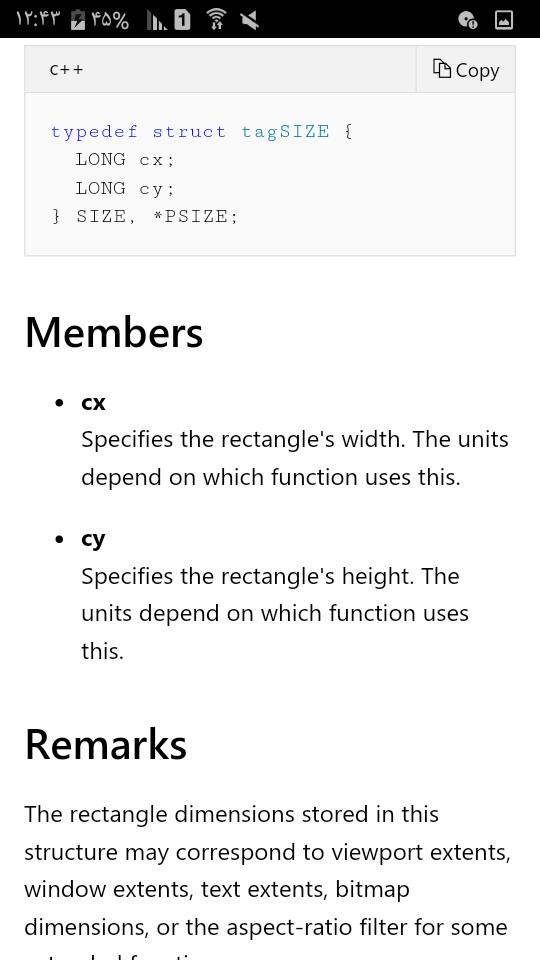
x As Long
y As Long
End Type
LPDRAWITEMSTRUCT lpdis =(DRAWITEMSTRUCT*)lParam
SIZE size
[char text[256
("sprintf(text, "%s", "Test
(SetTextColor lpdis.hDC,RGB(0, 0, 0
(SetBkColor lpdis.hDC,RGB(255, 255, 0
: case WM_CREATE

       "hButton = CreateWindow("button","Label,
                WS_CHILD | WS_VISIBLE | BS_DEFPUSHBUTTON,
                100, 200,
                50 ,20,
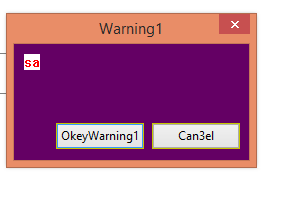
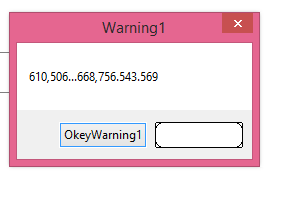
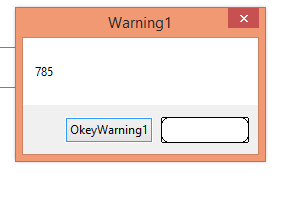
hWnd,(HMENU) BUTTON_ID, 0,0,پیام WM_PAINT جهت رنگ Client و WM_DRAWITEM برای باتن ساخته شده بجای باتن CANCEL
تست شده
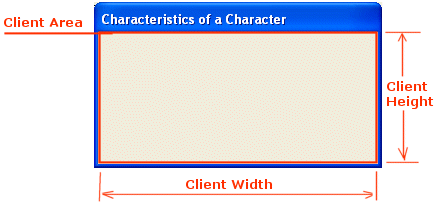
The WM_PAINT message is sent when the system or another application makes a request to paint a portion
of an application's window
The PAINTSTRUCT structure contains information that can be used to paint the.client area of a window
حاوی اطلاعاتی برای استفاده در نقاشی ناحیه ی Client پنجره.
Case WM_PAINT
Dim ps As PAINTSTRUCT
( hdc = BeginPaint(lhwnd, ps
Dim rrc As RECT
GetClientRect lhwnd, rrc
(( FillRect hdc, rrc, CreateSolidBrush(RGB(100, 0, 100
SetTextColor hdc, vbRed
TextOutA hdc, 10, 10, "sa", 2
EndPaint lhwnd, ps
ReleaseDC lhwnd, hdc
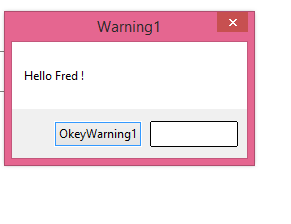
البته غیر از پیام زیر میشود با پیام WM_CTLCOLORBTN هم رنگ باتن را تغییر داد که lParam میشود هندل باتن و wParam هم هندل DC میشود
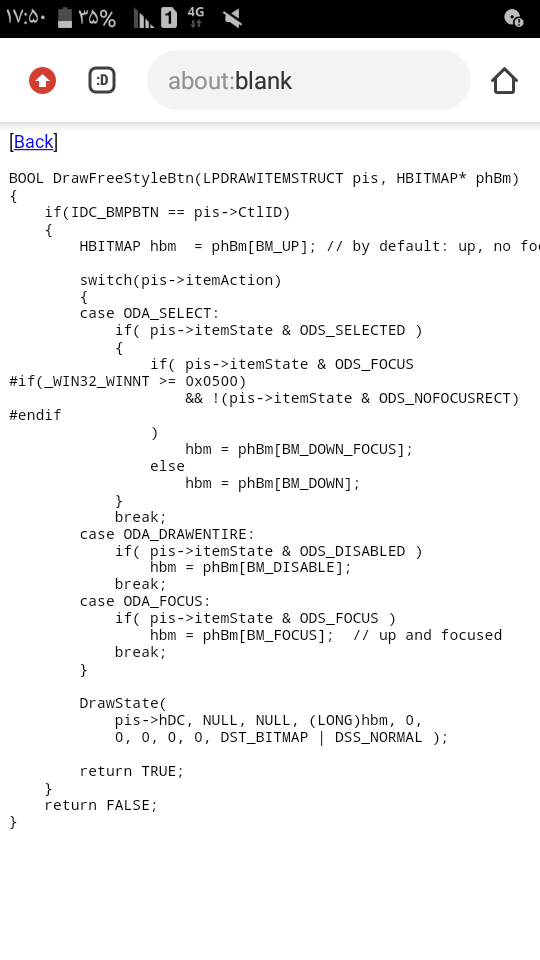
Case WM_DRAWITEM
Dim pDIS As DRAWITEMSTRUCT
Dim state
(CopyMemory pDIS, ByVal lParam, Len(pDIS
( hdc = GetDC(pDIS.hdc
Dim p As RECT
p = pDIS.rcItem
state = pDIS.itemState
GetClientRect can, p
If pDIS.CtlID = 2 Then
If state = 272 Then
RoundRect hdc, p.Left, p.Top, p.Right, p.Bottom, 16, 16
ReleaseDC can, hdc
Else
RoundRect hdc, p.Left, p.Top, p.Right, p.Bottom, 4, 4
ReleaseDC can, hdc
End If
End If
(CopyMemory ByVal lParam, pDIS,Len(pDIS
An HDC that specifies the handle to the display context for the button
lParam
)An HWND that specifies the handle to the button